Every screen in GuitarSesh

All 50 screens from the current build, v3.2J Alpha, in the order the start menu puts them. Click any one to see it full size.

Start & first run

8 screens

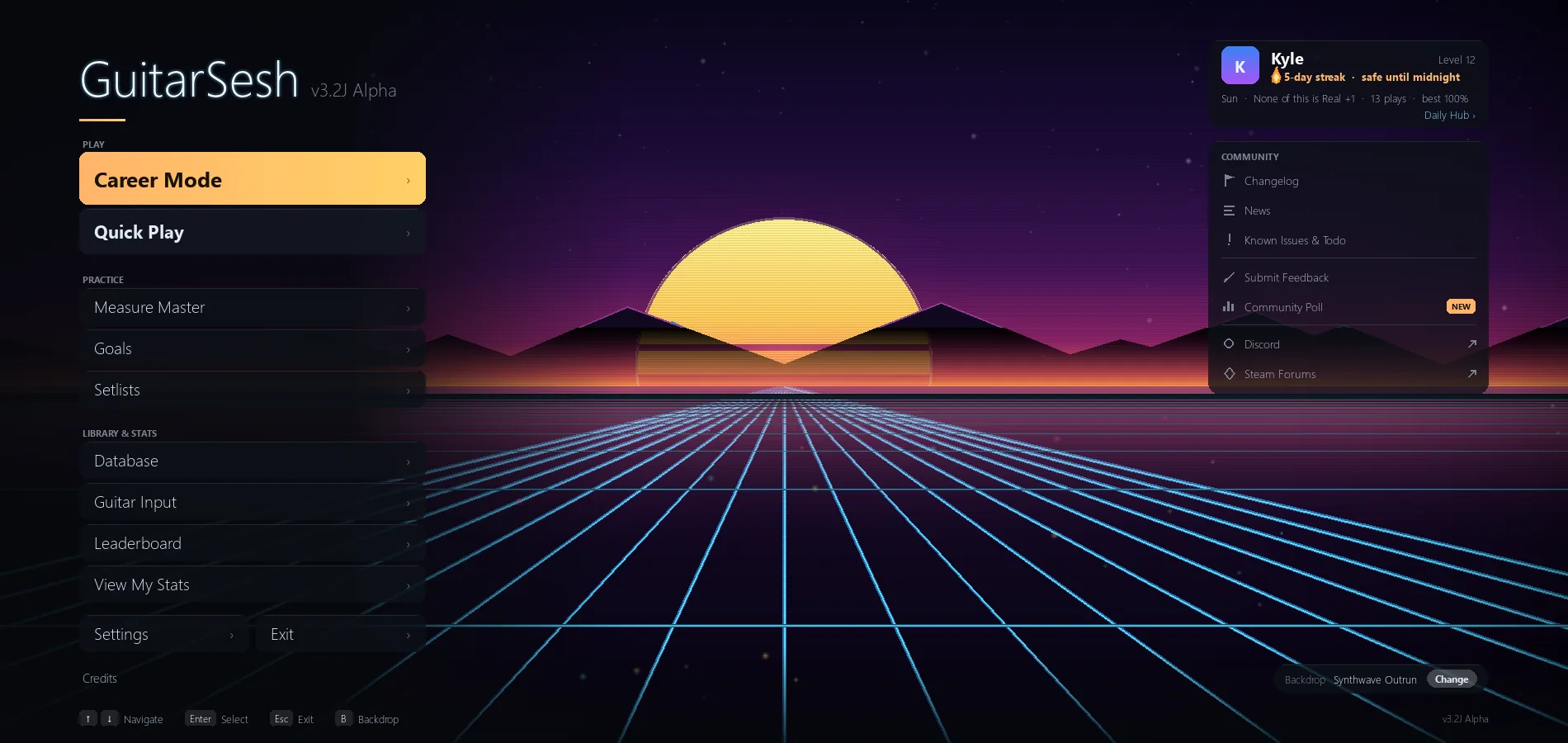
Start menu

The start menu on the Synthwave Outrun backdrop, with a live player card showing a running streak and the last song played.

This is the room the game opens in. Every mode is one click away, and the card on the right is me: the streak I am carrying, the last thing I played, and how long today's practice ran. The backdrop behind it is one of a shelf of animated scenes, and several of them move to whatever the guitar is doing while the menu sits idle.
First run: your details

Step three of the first-run rail, filling in the player name.

The first launch asks a short list of questions and nothing else. No account, no email, no online check. Name the player, point the game at the folder where the tablature files already live, and the rail across the top shows exactly how much is left.

First run: you're set

The last step of the first-run rail, ready to start.

The end of the first run. From here the game already knows where the charts are, which tuning to expect and who is playing, and it goes straight to the menu. Everything chosen here can be changed later in Settings.

Guided tour

The start-menu tour part-way through, spotlighting one menu button with the rest of the screen dimmed.

Every screen carries its own walkthrough. It dims the rest of the page, puts a spotlight on the one control it is talking about and steps through in order. Each tour runs once, can be replayed from the screen it belongs to, and re-arms when that screen changes enough to be worth re-learning.

Backdrops

The backdrop gallery open on the All tab, with one scene selected and its preview panel showing.

The menu backdrop is a choice, not a wallpaper. The gallery shows every scene with a live thumbnail, sorted into tabs, and a preview that fills the screen before anything is committed. A good number of them listen to the guitar and move with it.

Backdrops that react

The backdrop gallery filtered to the reactive tab.

The Reactive tab filters the shelf down to the scenes that answer the guitar. Play, and they brighten, ripple or pulse in time with what the pickup hears. They stay quiet when the room is quiet.

Twenty-nine languages

The language grid, every shipped language written in its own script with its English name underneath.

The first thing the game asks, and it asks it once. Every language is on one page in its own script -- no menu to hunt through, no restart afterwards -- and the choice can be changed from Settings at any point.

Who is playing

The profile roster with two profiles and the card for adding another.

More than one guitarist in the house, or one guitarist with more than one instrument: every profile keeps its own history, career and settings, and switching between them is one click. Nothing here is an account -- the profiles live on the machine.

Library & song picker

2 screens

Song picker

The three-pane picker with a tuning chosen, an artist selected and the song rows showing best score, play count and last-played date.

My own library, read straight off disk. Three panes: tuning, then artist, then the songs, so a drop-tuned chart never shows up while the guitar is in standard. Each row carries the best run so far, how many times it has been played and when it was last touched, so picking something is a decision rather than a scroll.

Choosing a set for a venue

The venue song chooser with the night's slots on the left and the library on the right.

Career venues want a set, not a single song. The same picker comes back with the slots for tonight down one side, so the choice is made against what the venue is asking for instead of in the abstract.

Gameplay

2 screens

Playing

A dense passage mid-song, a chord landing inside the finish slot with the streak running.

The note highway. Real notes off the chart, running to a finish line that is a slot rather than a line, so being early and being late look different at a glance. The pitch detector grades every note by what the guitar actually sounded, not by whether a button was pressed, and the word it gives back arrives fast enough to correct on the next bar.

The highway in motion

A short muted loop of the note highway mid-song.

The same highway, moving. Sustains glow while they are held, the finish slot lights as a note enters it, and the judgement word appears where the eye already is instead of off in a corner.

Song stats & leaderboard

5 screens

Song stats

The Plays tab after a personal best, showing the grade, the accuracy and the run history for this song.

What the last run was worth, and what every run before it was worth. A grade, an accuracy, the longest unbroken streak, and the whole history underneath so a good day is visible as a good day rather than a feeling. Tabs cut the same play apart by misses, by trend and by measure.

Song stats: every measure

The Measures tab with the weakest bars listed and the per-measure grid of recent plays beside them.

The same run broken down bar by bar. Each measure gets its own accuracy and its own history, and the grid on the right is every measure of every play at once, so the bar that keeps going wrong stops being a guess. One button sends that bar straight to the drill.

View My Stats

The report being assembled, sixteen of its twenty sections done and the fretboard heatmap being built.

One button on the menu turns the whole history into a report and opens it in the browser. Twenty sections: the song mastery pyramid, a year-by-year breakdown, the fretboard heatmap of where the hand actually spends its time, the personal bests, the milestones and the achievements. It lands as a single self-contained file next to the other practice data -- nothing is uploaded, no account is involved, and it still opens years later.

Leaderboard

A song's board with several profiles listed and the best runs ordered by score.

One board per song, per arrangement, for everyone who plays on this machine. It is local: nothing is uploaded and nobody else's scores arrive. That makes it a household scoreboard rather than a ranking, which is the only honest thing a single-player game can offer.

After the song

The results hub after a saved run, offering the report and the next song.

The landing after a run finishes. It says what was saved, offers the same song again, the next one in the set, or the full report, and it is the one place that quietly notices things worth telling me about the session.

Measure Master

3 screens

Measure Master

The practice list with songs ordered weakest first and one section selected, ready to drill.

The screen that answers 'what should I practise'. It reads every play I have ever recorded, finds the weakest stretch of each song and puts them in order, so the shortlist is built out of my own misses rather than out of a curriculum.

Setting up a drill

A drill configured to run until the target is met, with the tempo set to climb gradually.

A drill is a few bars on a loop, and this is where its shape gets decided: which bars, how many clean passes end it, and whether the tempo starts slow and climbs each time it is beaten. The strip along the top is the song, with the chosen stretch lit.

Drill complete

A finished drill that met its target, with each pass improving on the last.

What the drill changed. Every pass as its own bar, the target line across them, and a plain sentence on what got better and what is still the weak spot. It also names the next stretch worth working, so the session keeps going without a decision.

Career

4 screens

Career map

The North America region with countries in progress, one complete and the next unlock called out.

Career mode is a tour. Regions open into countries, countries into cities, cities into venues, and each one wants a set played to a standard before the next unlocks. The map is real geography, and the songs are the ones already in my own library.

A venue

A venue part-way through the night, two songs played and graded, the next one queued.

One night at one venue. The set for tonight down the middle, what the room expects on the left, and the running score on the right. Songs already played keep their grade, so a set can be rebuilt around the one that let it down.

Venue conquered

A venue conquered: three songs played, 94.4% across the night, a 143-note streak, and the confetti still falling.

Finishing a venue is not a line in a log. The screen takes over, names the room, and lays out what the night was worth -- how many songs, how accurate across all of them, the experience earned and the longest unbroken run of the evening. The bigger the milestone the louder it gets; a city, a country and the whole map each have their own escalation above this one.

Career statistics

The career overview with recent shows charted and the next venue called out.

The tour so far. Cities cleared, venues conquered, how each recent show scored and which room is next. It is the only place the career numbers sit together, and it is read from the same play records as everything else -- nothing here is a separate score.

Goals & Daily Hub

2 screens

Goals

Active goals with their progress bars, one of them charted and close to clearing.

A goal is a number on one song: an accuracy to reach, a streak to hold, a tempo to survive. The screen tracks how far off each one is, charts the runs that got closer, and clears it the moment a play beats it. Goals follow the profile between machines.

Daily Hub

The hub on a Monday with a weekend streak alive, a session to resume and a suggestion for something new.

A short answer to 'what should today be'. It carries the streak, picks up whatever was left half-finished, suggests something new off the back of what has been neglected, and lists the last fortnight of sessions so a gap is visible without being scolded about.

Setlists

1 screen

Setlists

A saved set open with its running order, and the sessions played against it along the top.

A setlist is a run of songs played back to back with the clock running, which is a different skill from playing one song well. Build it, name it, reorder it, and the game keeps every session against it so the set itself has a history.

Tuner & Setup Doctor

5 screens

Tuner

Five of six strings already in tune, the sixth just confirmed under a string lock.

A tuner that knows which string is being asked for. Left alone it follows whatever is played; locked to a string it stays there, so a badly slack string reads as slack instead of quietly agreeing with the string below it. Each one confirms as it lands, and the count at the side says how much is left.

Setup Doctor: the check

The octave check finished, naming the strings whose saddle needs moving and leaving the rest alone.

An in-tune open string that goes sharp at the twelfth fret is a setup problem, not a playing problem, and it will fight every practice session. The quick check listens to each string open and fretted and says plainly which ones are out and by how far.

Setup Doctor: the fix

A string mid-adjustment, the live cents reading falling as the saddle moves.

Having found the problem it walks through the repair: which way the saddle moves, how far, and a live reading that updates while the screwdriver is still in hand. It is the part a shop normally does, explained well enough to do at the kitchen table.

Chord Library

The chord library in grid view with a taught chord selected and the strum check reporting it detected and locked on.

The pitch detector is TAUGHT chords rather than left to guess at them. Strum a shape once and it keeps the tone that identifies it; from then on the panel on the right says plainly whether what the guitar just played registers, how far off it was in cents, and offers to re-learn it on the spot. Every shape in the library carries its own diagram and its own status, so the ones still waiting to be taught are obvious at a glance.

Calibrate latency

The calibration finished: 34 ms measured against a previous setting of 120, a tight consistency spread, and fifteen of sixteen notes counted.

Every interface adds a delay between the string moving and the computer hearing it, and a chart graded against the wrong delay punishes playing that was actually in time. Sixteen notes across three strings measure it, outliers are thrown out, and the screen reports both the number and how steady the run was -- so a sloppy measurement says it was sloppy instead of quietly becoming the setting.

Amp, Effects & input device

4 screens

Guitar input

The guitar input hub with its six tiles on the Control Room backdrop.

Everything about getting the guitar into the computer, in one place: pick the input, tune up, check the setup, shape a tone, and measure how much delay the interface adds so the grading lines up with what the ear heard.

Amp and effects

The tone shelf, with one tone selected and its chain summarised.

A clean signal through a laptop sounds like a clean signal through a laptop. The amp gives it a voice: a shelf of ready-made tones to start from, each one a full chain rather than a preset name, and all of it running live while playing.

The signal chain

The signal chain with one pedal stage opened and its controls showing.

Behind every tone is a chain that can be taken apart: pedals in order, the amp, the cabinet, each one switchable and each one with its own controls. Bypass a stage to hear what it was doing. Nothing is baked in.

Choosing the input

The device scan finished, having found the guitar on one of the listed inputs.

The scan listens to every input the machine reports and says which one the guitar is actually coming in on, rather than asking me to guess from a list of driver names. What is shown here is what this one computer reported on one day; it is a search for the right socket, not a verdict on any piece of hardware.

Settings & Update Library

7 screens

Settings

The Gameplay tab with the hit-window panel open and the finish slot drawn to match the current numbers.

Settings are grouped by what they are for, and each one says what it does in a sentence underneath. The timing windows are open here, with a diagram of the finish slot that redraws as the numbers move -- because how strict the grading is should be my choice and should be visible before it is made.

Settings: the highway

The Highway tab with the note and colour options listed.

How the highway itself looks and behaves: note style, string colours, how far ahead the chart is visible, and how much of the scenery to keep. Someone who wants a plain, fast, quiet screen can have one.

Update library

The library update screen before a scan, with the jobs available listed as cards.

New charts get dropped in a folder; this is what notices. It re-reads the folder, registers what is new, spots what moved and leaves the play history attached to the song rather than to the file path.

Review what changed

The scan paused on its summary of what it is about to change, waiting to be accepted.

A scan that is about to change the library stops and shows the change first. Nothing is written until it is read and accepted, which matters when the thing being rewritten is years of play history.

Settings: the general page

The General category of Settings, with the language, profile and handbook rows.

The page every other door in Settings sits behind. The language the game speaks, which player is at the controls, and the handbook are all one click from here -- none of them buried, and none of them asked for again once they are answered.

How the game adapts the chart

The Dynamic Difficulty knobs at their shipped defaults, with the plain-English panel restating each one.

Most games ask a player to pick a difficulty once and live with it. GuitarSesh moves between eleven levels while the song is running, and this is where the rules it moves by are written down -- when it thins the chart out, when it gives the notes back, how long it waits in between. The panel on the right restates every setting as a plain sentence, so nothing about the adaptation is a mood.

How the game adapts the tempo

The Dynamic Tempo knobs for level 5 of eleven, with the level strip across the top.

The other half of the same idea: instead of thinning the chart, slow it down and speed it back up as a passage starts to land. Eleven levels run from well under the written tempo to the song as the author wrote it, and each one has its own rules for when to move and how far.

Notices

7 screens

Credits

The top of the credits: the copyright and trademark notice, then the core libraries with their licences.

GuitarSesh is one person's work, and it stands on a long list of open-source libraries. The credits name every one of them with its licence, alongside the copyright and trademark notice -- the same list that ships as loose licence files beside the game, so the obligations are met in the product and not just in a folder.

Known issues and what is next

The known-issues list as it ships, with the development to-do list underneath it.

Every bug I know about is written down inside the game, next to the list of what I am building. Nothing is hidden behind a support portal: the same file ships with the game, so a player can check whether the thing that just went wrong is already on the list before spending an evening on it.

What changed, and when

The changelog open on the newest release, with the older releases listed either side of it.

Every release is written up inside the game, newest first, in plain language rather than commit messages. The list arrives over the network, so a player sees a new entry on the launch after it is published -- they do not have to wait for the next build, and nothing here is behind a patch-notes website.

News from the workshop

The news list, newest item open at the top, as it is served to the game.

The longer notes that do not belong in a release list: what is on the beta branch, what a known issue actually means, why a build took three weeks. Written by the one person who builds the thing, and delivered to the game rather than to a mailing list.

Telling me what broke

The feedback form as it opens: empty, with the category buttons and the panel naming what is sent with it.

A bug report goes from inside the game to me, with no account and no support portal in between. The panel on the right names what travels with the message -- the platform, the build, the player id -- on the screen, before it is sent. If it cannot reach the server it is saved and offered again next time.

The handbook

The first handbook page, on how a guitar's strings and frets are numbered.

Four reference pages that stay in the game rather than being read once and dismissed: how the strings and frets are numbered, what each note effect means, which practice tools exist and what each assistance mode actually does. Open from Settings whenever a symbol on the highway is unfamiliar.

What the session noticed

The end-of-session tuning note, reporting which string drifted and by how much.

The game listens while I play and keeps a note of how the guitar behaved -- which string drifted, how far, how confident it is about that. It says so afterwards, quietly, instead of letting a slipping string turn into a bad practice session.

The start menu on the Synthwave Outrun backdrop, with a live player card showing a running streak and the last song played.